
Showing posts with label Technology. Show all posts
Showing posts with label Technology. Show all posts
Monday, May 10, 2010
3 Pieces of News That Will Interest Any Utahn


Saturday, May 1, 2010
More Paint.net Fun

Wednesday, March 31, 2010
How To Not Buy An Expensive HDMI Cable
Do you remember that time when you were in Best Buy or RadioShack, and you were needing to get an HDMI cable because your XBox 360 only came with a component cable? Do you remember how much it cost you? Yep, me too. To be blunt, if you spent more than 15-20 bucks on the thing, you got ripped off. You just need to shop around a bit, and most likely buy on the internet. The guys over at the Mint.com blog advocate spending no more than $10 on an HDMI cable. Take a look at the graphic they put together. It won't lead you astray.

Tuesday, March 2, 2010
More Lawsuits For Apple

"Touch Screen Device, Method, And Graphical User Interface For Determining Commands By Applying Heuristics"can mean just about any touch screen device on the market now. I can't see how you can patent an idea. It's ridiculous.
Now, let's look at this from a different angle. Most of the devices implied in the suit are Android powered. Does this set off any bells for anyone? It did for me. Apple seems worried now that they don't have the corner on the touchscreen market, and now they are starting to scrape and fight dirty to get it back. This isn't the first suit Apple has filed against wireless market competitors, and it won't be the last one either.
This is one of the best YouTube Videos I've seen in a while...
OK Go just put out a new video that is just mind blowing. Well, maybe I take it a little too far, but you'll see what I mean when you watch it. It's one of those chain reaction gizmo's that they put together for a video for a new song. Anyway, here's the vid:
Monday, March 1, 2010
This is truly the best Tech Guy call ever. I mean, how thick can you really get these days to not understand that they can have internet all of sudden without doing a thing, and then it "disappeared" just as fast, and you want some techy trick to fix it? Unbelievable......
Wednesday, January 27, 2010
iPad and State of The Union Adress: Which will be remembered?
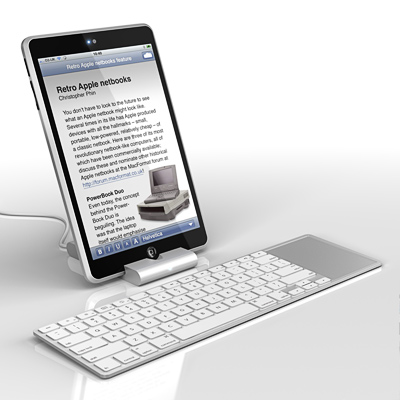
I cite first Engadget. The article of choice shows that a majority of their people who tested it found it underwhelming. There was not a whole lot of new groundbreaking technology. It seemed that it was just an expansion of the iPhone. Most of the apps that will run on it actually will be iPhone apps. I can't see why someone would need a netbook/iPhone hybrid. Just think about it. There's no point to it unless Apple can ad more features to it; like a camera w/ flash, word processing capabilities(or better than it has) and so forth. When those type of phone-laptop capabilities come together on a platform that does all very well, I'll be impressed.
The next subject I have chosen is the State of the Union Adress. I will not say much about it. All I will say is that President Obama's ideas on the betterment of our country will only cost more money of us, and as a result, cost us more jobs.
Neither one will not be remembered for anything remarkable. When someone looks back on this day in ten years, it will be to remember something else.
Sunday, January 24, 2010
JR Network Engineer
Way back in November, my brothers and I were tasked with getting a new computer hooked up to the network. That meant running wires. The best way was through the vents. However, it wasn't as easy as dropping a string down the vent from upstairs and then pulling it out in the basement. Someone had to go into the vent and see if they could grab it. That job fell to Ben, whom you will see in this video that we made.
Monday, January 18, 2010
Utah Cities Among Those With Fastest Average Internet Connection Speeds

Few, that was a mouthful.... moving on.
Well, in this recent article it was reported that the U.S. averages around 3.9 mbps. That really isn't anything to turn your nose up at. The only thing limiting speed is the stingy ISPs who want more money but don't deserve it because of crappy customer service. But what really caught my eye was that two Utah cities were among those with the fastest average internet connections in the U.S. That makes me proud. I even almost live in one of them. It also goes to show us all that we haven't totally been forsaken. The providers in other parts of the country just need to take a look at the top ten.
Friday, November 27, 2009
Twitter Desktop Clients
Before I get into any of this, I first have to say that I am very biased toward TweetDeck. It was the first desktop client that I found, and I fell in love with it. TweetDeck has been very reliable for me in all the time that I have used it.
So now into the reviews and comparisons. Please, if you feel the need to ridicule my disjointed and unstudied prose, use the comment section to it's fullest ability. I can take it.

Like I said before, I have been using TweetDeck for a long time now. The screenshot that you are looking at to the right is one that I took in TweetDeck itself. As you can see, the client, like so many others, will support not just twitter, but Facebook and Myspace as well. What I like about TweetDeck is all of the different tool and window options that are available. The ones that I use beside the Twitter and Facebook windows right now are the 'tweetdeck recommends' and 'direct comments' windows. You have the option to search on any given subject in twitter, and TweetDeck will put the most relevant tweets into it; or you can search for twitter users themselves. The list of options can go on for TweetDeck. Another new feature that the TD guys have added is the option to get the full news feed from face book, which includes the ability to comment, and view applications and so on. You virtually don't need to go to facebook anymore with TweetDeck. The program is very well put together. I found it completely intuitive to use for the first time, and has been a robust application. I really like this thing. Keep it up TweetDeck Guys!

Next on my list was Twhirl. This client looked very appealing to me at face value, but was a little different from what I thought it would be. Let me explain this. First off, in my own stupidity, I thought that it would be a full window program, but I really neglected to look at the screen shots that the website makes available. The next slight misconception was the way it worked. Twhirl can support almost any micro-blogging website or social network you want..... through a web service called Ping.fm. What the way it all works is that you set up a Ping.fm account, connect all of your social networks to it, and then you access Ping.fm from your desktop with Twhirl. When you update Twhirl for your twitter account, you can opt to update your Ping.fm account at the same time, and thus update your Facebook, linkedin, Myspace, you name it.
Other than all of that, I found on very apealling feature. Twhirl is in my estimation one of the only clients that offers you the option to recieve direct access to friendfeed. This is really why I wanted it. I can run it in the background along with TweetDeck. It's turned out great for me. I fully intend on keeping it around for a while.
The next client is called Sobees.com. What intrigued me here was the touted ability to link me not only to twitter and facebook from the desktop, but also to linkedin. Sorry, no screenshot here. For starters, Sobees failed to run in Ubuntu Linux. On the bright side, however, they are working on making it available to Linux users as soon as they can. I was not overly impressed with Sobees. It has the same old stuff in it like the rest of them, but what really rubbed me the wrong way was that it promises to set you up with linkedin.com access, but I was unable to access it. No matter what I did or where I looked for for support, I coudn't get linkedin to work. But I can say that there is a silver lining for Sobees.com, and that is the visual design that the developers put together was very appealing. I wish that TweetDeck had something similar.
To make mention of some other desktop clients, specifically Linux ones, I wanted to talk just a little bit about Gwibber and Twitux.
Gwibber worked okay for me, but I was not impressed with either the speed and reliability, or the layout and design. I don't run a very powerful system, but for a desktop client, that's no excuse.
I've heard much ado about Twitux. I haven't made myself very familiar with it, but I just wasn't impressed with my first outing in it. Twitux didn't combine my desire to have my Twitter, Facebook, linkedin and FriendFeed all together in the same client. It just did twitter. I might as well go to Twitter instead of use Twitux.
I hope that these short reviews have helped you all, at least the four of you who probably read this. But, seriously, I hope that you have got some good prospective with your Twitter desktop client search from me. My one last piece of advice would be to try a few out for yourselves. But, just so you have been duly warned, my preferences may differ greatly from your's.
Also, let me just make a quick mention about how much I have enjoyed using products(TweetDeck & Twhirl) programmed in Adobe's .air format. It is a very robust platform and has worked just fabulously in Ubuntu. All I had to do was download a plugin, and whammo! it all worked.
So now into the reviews and comparisons. Please, if you feel the need to ridicule my disjointed and unstudied prose, use the comment section to it's fullest ability. I can take it.


Other than all of that, I found on very apealling feature. Twhirl is in my estimation one of the only clients that offers you the option to recieve direct access to friendfeed. This is really why I wanted it. I can run it in the background along with TweetDeck. It's turned out great for me. I fully intend on keeping it around for a while.
The next client is called Sobees.com. What intrigued me here was the touted ability to link me not only to twitter and facebook from the desktop, but also to linkedin. Sorry, no screenshot here. For starters, Sobees failed to run in Ubuntu Linux. On the bright side, however, they are working on making it available to Linux users as soon as they can. I was not overly impressed with Sobees. It has the same old stuff in it like the rest of them, but what really rubbed me the wrong way was that it promises to set you up with linkedin.com access, but I was unable to access it. No matter what I did or where I looked for for support, I coudn't get linkedin to work. But I can say that there is a silver lining for Sobees.com, and that is the visual design that the developers put together was very appealing. I wish that TweetDeck had something similar.
To make mention of some other desktop clients, specifically Linux ones, I wanted to talk just a little bit about Gwibber and Twitux.
Gwibber worked okay for me, but I was not impressed with either the speed and reliability, or the layout and design. I don't run a very powerful system, but for a desktop client, that's no excuse.
I've heard much ado about Twitux. I haven't made myself very familiar with it, but I just wasn't impressed with my first outing in it. Twitux didn't combine my desire to have my Twitter, Facebook, linkedin and FriendFeed all together in the same client. It just did twitter. I might as well go to Twitter instead of use Twitux.
I hope that these short reviews have helped you all, at least the four of you who probably read this. But, seriously, I hope that you have got some good prospective with your Twitter desktop client search from me. My one last piece of advice would be to try a few out for yourselves. But, just so you have been duly warned, my preferences may differ greatly from your's.
Also, let me just make a quick mention about how much I have enjoyed using products(TweetDeck & Twhirl) programmed in Adobe's .air format. It is a very robust platform and has worked just fabulously in Ubuntu. All I had to do was download a plugin, and whammo! it all worked.
Tuesday, November 24, 2009
Pay-As-You-Go Wireless Data Plans
Here is something to chat about around the water cooler. AT&T is now going to offer pay as you go data plans for those nifty 3G enabled laptops all the wireless dealers are pushing these days. As stated in the article, AT&T is trying to reach a larger customer base.
This seems to me like the logical thing to do from a Huge Company point of view.
My illustrious and vaunted point of view?
Tons of people have cell phones these days, and they don't come cheap, especially on a month to month basis. Owning a cellphone, however is considered a necessity while having a netbook with 3G wireless network is not. I mean, if I can get free wireless internet with my netbook at most McDonalds' or airports, it doesn't make sense to pay Sprint or AT&T exorbitant amounts of money just for internet. Am I expected to pull my computer out of my pocket and start video conferencing for school while trying to drive on the freeway?(I wish...)
But for those gullible enough to go with the pay as you go rubish, they are going to get less bandwith for near the same price. $60 for a regular two year plan, $50 for the month pay as you go plan. It's a no brainer to me.
You never know though. There is probably some guy out there fantasizing about being able to type up and send that report to Johnson while wrangling with traffic on the 405.
Who Reads The News?

I, for one, am one of those fuddy-duddies that is totally obsessed with the news. In the past, I ended up visiting like 10 to 15 news sites frequently per day. It was monotonous, but I need the news to feel "plugged in" to the world. I ended up finding Google Reader, an RSS feed reader. It's been very useful with consolidating my news and tech updates that I just couldn't live without. It was okay at organizing everything. It was also very robust, and loaded very quickly. I would recommend it to anyone who is just discovering the greatness that is reading the news via RSS.


Along with all of these great features, I really like the option of seeing my news in so many different formats. It makes for a quick trip to find exactly what I'm looking for. A great option that you have is that you can set which one of these pages as the one you see first when you log in.
For all of you who are current Google Reader users, you needn't worry about having to re subscribe to everything you already get there. As an extension, Feedly will automatically see your browser history and incorporate all of your Google Reader stuff.
All in all, I was very surprised to find an RSS reader that would exceed my bias towards Google Reader, and Feedly did just that. With the great way to organize all of your feeds, wide range of features and a slim and robust design, I really have come to love using Feedly.
Monday, November 23, 2009
Clicker Is Cool
 In the course of my usual perusal of a great many favorite websites, I came across a curious link. And where did it lead me to, you ask? Well, it lead me to the best site in the whole world, at least for today. I found Clicker. What Clicker allows you to do is base your TV watching operations from one site. As we all know, there is tons of TV just waiting to be streamed from online, but its scattered all the way to kingdom-come. So when you create an account with Clicker, you can search for your favorite shows, and it will create a playlist for you. All you do is select the show, and it links you right to the original source for your viewing pleasure.
Another nifty feature is that Clicker also includes in its pool of searchable programs professional, high-quality web-shows that are gaining in popularity by leaps and bounds. So when you go off on a search in any category, you can discover some great new shows that are web-based.
I've been playing around on Clicker all morning, and I've got to tell you all that it's definitely worth getting an account and seeing what it can do. Best of all, the service that Clicker provides is free!
Friday, November 20, 2009
Google Chrome OS
The thought has intrigued me since I first heard the news that Google is currently developing an OS of their own, based on the Linux kernel. There has been a lot of buzz around the internet, and in particularly within the last few days, surrounding a Google press event held yesterday to show off a preliminary version for reporters, and to answer any questions.
From most of the reports that I've read, the presenter, Sundar Pachai, who is a Google VP, danced around some questions that press in the minds of many who follow Google. For instance, some may ask what the pricing will be for an OEM netbook, or something similar, and the answer invariably is "we can't say". For the most part, according to this Cnet article, Pachai did not reveal anything that hasn't been known already, which to me is a big disappointment.
On the upside, what fascinates me with Chrome OS is that Google is developing the software with netbooks in mind. They are focusing in large part on bringing to bear the power and connectivity of a regular laptop and at the same time making it mobile, quick and responsive. In the link embedded in the previous paragraph, you can see exactly what Google's hardware specs are for the OEM version.
Other problems that skeptics(and you can include me here) is the OS's branding. I don't see why Google has both a browser and an OS of the same name. True enough that Chrome OS and the Chrome browser will be very similar in style and function, but I'm concerned that there might be some confusion and lead to some branding issues.
All that being said, as an avid(though novice) Linux user, I'm excited to see the launch of Chrome OS sometime next year. No doubt we'll see many blog posts and news articles all over the internet divulging new features or problems, so I'll keep my eye out.
Monday, November 16, 2009
Grooveshark Blows Pandora Away

Well, on to the review. This online music streaming service works in a similar way to Pandora. The big, and decisive difference is that it's just like you had the biggest cd collection in the freakin' world, which means that you get to pick and choose which songs play and which ones don't. You search for artists and individual songs, pick 'em, add 'em to a playlist and save it. Just like that. You just have to put up with a huge ad on the side, which isn't too obtrusive at all.
I also liked a few more things that Grooveshark did. Formost among them is to add a "similar artist" search. That way it allows you to branch out without having to wade through a bunch of crap like Pandora makes you do. You also have at a mouse-click the ability to see what others are listening to and to see what is popular that day.
I know that this was kind of a short review, but I gotta play around with this stuff some more. You can check out Grooveshark for yourselves here.
Sunday, November 15, 2009
Ubuntu Linux: Way Better Than Windows
I know what you all are thinking. "Daniel's gone insane(I know you knew that already dad), Windows 7 just came out and he's just jealous that he can't have it, he doesn't really know what he's talking about" and on and on it could go. I admit, many arguments may have a foundation on truth, but that's not at issue here. (or is it)
To tell you the truth, I bought a netbook about 6 months ago because it would serve me as my college note-taking and paper writing platform. I has done very well so far, but there are a few things that would just bug me all the time. Foremost among my hate for some things windows is the insane time it took to boot the operating system. It was way to cumbersome(under my standards) to boot the stupid thing in class. Other reasons to hate the thing is that Windows(I was using XP) would have these crazy seziures all the time. I don't know what was going on there, but it just wouldn't handle a certain number of programs running all at once, have a coronary, and keel over. How did I remedy said problem? Reboot. Microsoft might even say the same thing. I heard a funny joke a few years back.... or was it a true story based on fiction... anyways, the most seen fix for most windows issues is of course, format and reinstall. It's true, if you got something unfixable, you can just try to back up all your files and blow away what you got going on, and start over, and repeat ever 1-2 years. There, your set for life.

But, hearkening back to my swingin' computer nerd days(I'm a geek now, but most don't realize that there is a fundamental difference between them)when my brothers and I would play around with lots of different Linux distros and UNIX or BSD, I looked into Ubuntu linux, found out my dad and another brother were running it, and looked into it. Turns out they have an OS optimized just for netbooks. I looked into some more, here and there, and finally decided to take the plunge. Turns out it was great. As you can see from the screenshot taken from my machine, the desktop layout for netbooks is way different from what you would normally see in most(even linux) OS's, the model for norm being taken from Windows and Mac. The desktop layout has been optimized for the screen size of a normal netbook. It makes it so everything is displayed cleanly, but also adds the practicality we've come to expect from normal GUI interfaces. Everything looks clean, is extremely customizable, and if you dual-boot with windows, will even automatically port all of your documents and desktop settings from windows.

As you remember, I was most concerned with the Windows boot time being tediously slow. Now don't just tell me that "you've got a netbook, Daniel, is just gunna do that to you." Well, I reject you reality, and substitute my own! My very first boot into ubuntu took just under a minute from pushing the on-button to checking my email. Now tell me netbooks are crap. I'm also pleased that I can go to class and start taking notes on this rig just as fast as if I were using a real pen and paper.

For all of you now intrigued, but not willing to give up on windows, you can partition your harddrive so that you can boot both windows and ubuntu. As a matter of fact thats what I did.
You can read a very good review on the latest update of Ubuntu, now at 9.10, here at technewsworld.com.
To tell you the truth, I bought a netbook about 6 months ago because it would serve me as my college note-taking and paper writing platform. I has done very well so far, but there are a few things that would just bug me all the time. Foremost among my hate for some things windows is the insane time it took to boot the operating system. It was way to cumbersome(under my standards) to boot the stupid thing in class. Other reasons to hate the thing is that Windows(I was using XP) would have these crazy seziures all the time. I don't know what was going on there, but it just wouldn't handle a certain number of programs running all at once, have a coronary, and keel over. How did I remedy said problem? Reboot. Microsoft might even say the same thing. I heard a funny joke a few years back.... or was it a true story based on fiction... anyways, the most seen fix for most windows issues is of course, format and reinstall. It's true, if you got something unfixable, you can just try to back up all your files and blow away what you got going on, and start over, and repeat ever 1-2 years. There, your set for life.


You can read a very good review on the latest update of Ubuntu, now at 9.10, here at technewsworld.com.
Tuesday, November 10, 2009
Google Wave Invites
Okay, so I've been thinking about this for a while and I've come to the conclusion that with just a few Wave invites left and no one to give them to, I'd offer them up here. I have 5 left.
To reference back to an earlier post of mine, Google Wave is an innovative real-time collaberation tool that is similar in some respects to email. In fact, google intends for it's Wave protocal to replace email. What happens is you place a message, add whichever contacts that you want to see the message, and the post is there for all to see, and is meant to be edited and added to. Neat apps allow you to have video conference, ad a poll, ad a map with the destination of an even and so on. It's a great tool. Let me know if you want one of the 5 left in my comments section.
To reference back to an earlier post of mine, Google Wave is an innovative real-time collaberation tool that is similar in some respects to email. In fact, google intends for it's Wave protocal to replace email. What happens is you place a message, add whichever contacts that you want to see the message, and the post is there for all to see, and is meant to be edited and added to. Neat apps allow you to have video conference, ad a poll, ad a map with the destination of an even and so on. It's a great tool. Let me know if you want one of the 5 left in my comments section.
Tuesday, November 3, 2009
Ridin' The "G"-Wave
Google Wave is unlike anything we’ve all seen out on the internet. I’m by no means an expert on the subject, but because I have been able to get a preview account, I’ve been playing around with it.
First of all, you need to understand what it’s purpose is before you can really be excited for it; at least that’s the way it was for me. Wave was conceaved with the thought that went along the lines of, “what would email look like if were developed today?” And so the Google team took this idea and ran. Find out the whole story from the Google guys themselves. The rest is history, at least for them. For us it’s just beginning. What Wave does for us is to create a real-time collaborative environment, where users can post messages, select who can see the message, and then add to or edit the message in any place. Gone are the days of cut and paste into a reply message to gain maximum clarity. Just place your reply beneath the statement you’re replying to.
Along with these abilities that will virtually eliminate forwarding or replying(and hopefully get rid of “chain email”) many third party and independent developers are working on applications to fit inside a wave. Uses for these are manifold. Some of the currently available extensions include a “yes-no-maybe” poll application that makes it easy to quantify how many will attend an event or who agrees or disagrees with you. Others that can be used are a map/trip planner powered by Google Maps, handy in setting meetings or trips, video conferencing, and a few others. There will most likely be loads more by the time the official release comes around.
As with any product in beta testing, there are bugs to be hashed out, but Google is doing a great job with keeping up with a wealth of reports, as well as keeping a help forum well managed. Additional functionalities seem to be forthcoming,(probably somewhat based upon user suggestion?) like mass-selecting waves in your inbox so that you can trash or move to a different folder. At least I would like to see that feature added.
All in all, I have enjoyed my experience getting to know Google Wave. With the real time communication/collaboration at it’s core, with all of the functionality to edit and reply to specific messages and statements, to the extensions, and last but not least, the users who find great ways to use the product make Wave a real force to be rekoned with.
Sunday, October 11, 2009
Google Is Awsome
To be absolutely honest, I've been a Google customer for a long time, but have never been one to take advantage of a lot of their products outside of Gmail or the calender app. But for the past few weeks, I've been kicking myself for not learning how to program and create new apps for the internet like my younger brothers have learned to do, because if I had, I'd be working on Google wave right now, enjoying it's awsomeness. But, what I have gained from it is a new-found love for all that Google has to offer. If you haven't looked into Google beyond it's better-than-anything search function or Gmail, you must at least investigate what it has to offer. I have found tons to play around with and even more to make life easier.
Like I have mentioned, the calender function is far and away better than Microsoft Outlook because it is a whole lot easier to figure out, and it doesn't lack for features. I've dabbled with a lot of the apps for years, but like I said, the last few weeks have taught me what I can really do with Google Apps. I've really been impressed with Picasa, with it's facial recognission feature, to it's internet accessability. I enjoy the RSS reader, and have also been using it for years. I have used iGoogle as my homepage for a while as well. What I have really discovered is apps like Knol, Docs and Blogger. The genious here with google is linking it all together with one account. I don't have to sift through heaps of internet crap to get what I need. It's all here. I've found I almost always have a google tab open in my firefox window all the time.
So remember, take the time and get to know the Google Apps.
Subscribe to:
Posts (Atom)

